
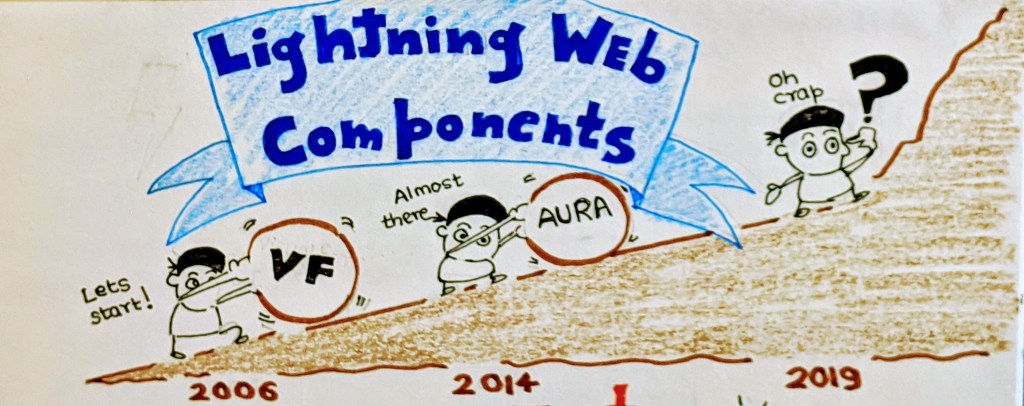
This blog is primarily intended to serve as a refresher and a quick primer to know and then speak about LWC to anyone (customers, partners, fellow developers and in community). I have always tried to conceive complex ideas and concepts with visualizations. It helps with the retention and gives you talking points to speak if needed.
If you have been in the Salesforce ecosystem from its nascent stage, you would have had a firsthand experience of the transformation that has occurred in the platform’s frontend technology. From the primitive era of ‘S-controls‘ to the more popular ‘VisualForce‘ and then ‘Aura‘. (Or Lightning Components)
Continuing with this evolution, Salesforce has introduced Lightning Web Component framework and finally committed to the web standards. It has broken the proprietary shell and has gone open source. This is really a bold step!
But what this change in the UI tech brought to the platform and to the developers ? And the answer is – It has paved ways for both increased performance and ease for developers to implement it.
But this also meant for developers to keep up to the changing pace and climb that steep learning curve. But at Salesforce and with our Ohana, we have always coped up. Haven’t we ? And this time, it shall be no different !
Duh ! Another framework ? Another web language ? When I started learning LWC, I had 3 questions in my mind. We will cover the introduction to Lightning Web Component framework by answering these 3 questions.
- Why Lightning Web Component was needed ?
- What is Lightning Web Component framework ?
- How can you implement Lightning Web Component framework ?
Why Lightning Web Component framework ?

The answer is – The web stack as we know has changed significantly between the time Aura component framework was brewing and the modern times. The pink part that you see are the web standards and the green represents the things that a proper Javascript framework handles.
The web stack as we know has changed significantly between the time Aura component framework was brewing and the modern times
As you can see during 2014, the web standards comprised of mostly – Standard Elements, Rendering, Events and the use of ECMA Script 5. As a result, most of the heavy-lifting had to be done by the framework (green part) like – Custom elements, Data Services etc. This resulted into proliferation of frameworks. There came JQuery, Angular, React, Ember etc (I can go on and on…). Each with its own unique way of handling the green part. Hence if your project chose React framework, you had to hire a React Developer. You see the problem ?
A lot of innovation happened in the web standards since then which resulted into a much more robust and a modern stack. Most of the things that these frameworks solved, found their way into the standards ! (Look at the image in 2019. More of pink and less of green!). This standardization paves way for a new breed of frameworks. Their job now will not be to fill the gaps which standards lacked but to provide more specialized services specific to the platform.
What exactly is Lightning Web Component Framework?

Lightning Web Component Framework is Salesforce’s take on this new breed of framework which is built on web standards. It involves the use of Custom Elements, Shadow DOM, Templates, Decorators, Modules and other new ECMA Script 7 and beyond language constructs. Try and remember these terms because you are going to hear a lot about them in your journey to master Lightning Web Component Framework.
The components that we develop using this framework are called as lightning web components (hereon referred to as lwc). Just like we had a bundle for the aura components which contained all the files used to implement a lightning component, we need files to form a lwc.
There are 3 files which you need (mandatorily) to create a lwc.
- A Javascript File (.js)
- A Html File (.html)
- A Meta XML file (.js-meta.xml)
For an introduction, you just need to know the basic structure of a lwc. We are going to discuss in detail about all these files (and few additional ones too) in our next blog.
But there would be another question looming in your mind – Can lightning web components and aura components coexist ? Are they interoperable ? And the answer is – YES !
Lightning web components and aura components can work together but with one caveat
Aura components can contain lightning web components but lightning web components cannot contain aura components
How can we create and implement LWC ?

Visual Studio Code + Salesforce CLI + Plugins + Scratch/Non Scratch Orgs
You will need tools to build lwc. Primarily you will need the following
- Visual Studio Code and plugins – Salesforce’s go to IDE now for developing everything – including Apex and Aura components
- Salesforce CLI – Command Line Tool which can run and understand the sfdx commands
- Salesforce Orgs – Scratch Orgs (if DX is enabled) Or Non Scratch Orgs (Regular Dev Environment)
Please follow the trailhead to setup these tools. You can also find how to use VS code if you are using a Non DX Or a DX here.
This blog is primarily intended to serve as a refresher and a quick primer to know and then speak about LWC to anyone (customers, partners, fellow developers and community). I have always tried to conceive complex ideas and concepts with visualizations. It helps with the retention and gives you talking points to speak if needed.

As I said, this is just an introduction to lwc and we are going to deep dive in it with upcoming blog posts. The next blog post is ‘Anatomy of a lightning web component’. Stay tuned and happy learning!
 Humbleforce
Awesome content bro 👌
LikeLike